
Dec 8, 2025
Dec 8, 2025
1001 Record App — The BEST Screen Recorder for Mac (No Debate)
Clean. Fast. Powerful. And honestly… way better than most paid recorders.
Quick note: this article includes insights from one of our users — and we truly appreciate their review and feedback.
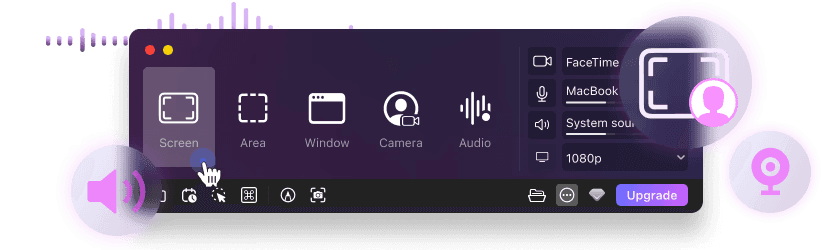
If you're tired of clunky Mac screen recorders that come with time limits, watermarks, lag, or confusing interfaces, you’re not alone. I’ve tested more than enough of them — but 1001 Record stands out immediately.
It’s simple, extremely smooth, privacy-friendly, and surprisingly generous even in the free plan.
Ready to try it?
⬇️ Download 1001 Record | macOS

Clean. Fast. Powerful. And honestly… way better than most paid recorders.
Quick note: this article includes insights from one of our users — and we truly appreciate their review and feedback.
If you're tired of clunky Mac screen recorders that come with time limits, watermarks, lag, or confusing interfaces, you’re not alone. I’ve tested more than enough of them — but 1001 Record stands out immediately.
It’s simple, extremely smooth, privacy-friendly, and surprisingly generous even in the free plan.
Ready to try it?
⬇️ Download 1001 Record | macOS

Clean. Fast. Powerful. And honestly… way better than most paid recorders.
Quick note: this article includes insights from one of our users — and we truly appreciate their review and feedback.
If you're tired of clunky Mac screen recorders that come with time limits, watermarks, lag, or confusing interfaces, you’re not alone. I’ve tested more than enough of them — but 1001 Record stands out immediately.
It’s simple, extremely smooth, privacy-friendly, and surprisingly generous even in the free plan.
Ready to try it?
⬇️ Download 1001 Record | macOS

Why 1001 Record Wins (Easily)
From the official feature list and hands-on use, it’s clear that 1001 Record isn’t just another entry in the crowded recorder market—it genuinely solves the frustrations people have with other apps.
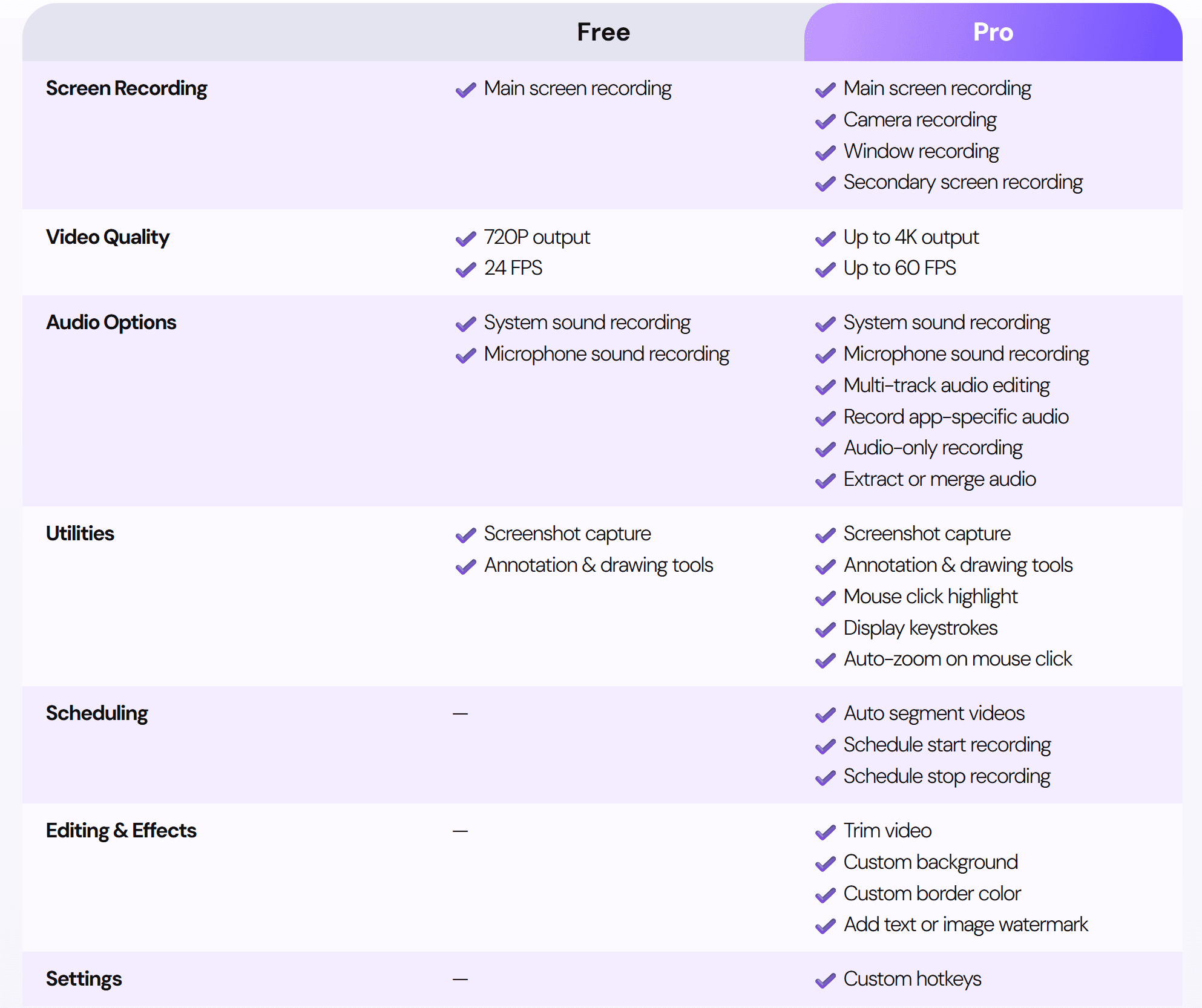
Here’s what gives it the edge:
💎 4K 60FPS recording for crisp, high-quality visuals.
🔊 System + microphone audio captured perfectly in sync.
🪟 Full-screen or custom window capture, depending on your workflow.
🪟 Specific Window Recording — arguably one of its most impressive features. You can lock onto a single app window even when it’s hidden behind others or out of focus.
🎹 This is exceptionally useful for music producers, who often need to record VSTs, plugins, or DAWs while interacting with other apps.
🎥 Camera/webcam recording built right in.
🖱️ Mouse click effects for tutorial clarity.
✂️ Integrated video trimming, eliminating the need for extra editors for simple cuts.
📝 Annotation tools that make explanations clearer.
🕒 Scheduled recordings for hands-free workflows.
📸 Screenshot tools with background editing for quick documentation.
🔐 Local storage only — no cloud uploading, no privacy risks.
🆓 Free version with 10 free full-access uses (with Pro features) - After that, basic screen & audio recording stays free.
💰 Lifetime License for $49.99 — one payment, keep it forever.
What’s refreshing is the transparency: no forced subscriptions and no hidden limitations. The app simply does what it promises, and does it exceptionally well.
From the official feature list and hands-on use, it’s clear that 1001 Record isn’t just another entry in the crowded recorder market—it genuinely solves the frustrations people have with other apps.

Here’s what gives it the edge:
💎 4K 60FPS recording for crisp, high-quality visuals.
🔊 System + microphone audio captured perfectly in sync.
🪟 Full-screen or custom window capture, depending on your workflow.
🪟 Specific Window Recording — arguably one of its most impressive features. You can lock onto a single app window even when it’s hidden behind others or out of focus.
🎹 This is exceptionally useful for music producers, who often need to record VSTs, plugins, or DAWs while interacting with other apps.
🎥 Camera/webcam recording built right in.
🖱️ Mouse click effects for tutorial clarity.
✂️ Integrated video trimming, eliminating the need for extra editors for simple cuts.
📝 Annotation tools that make explanations clearer.
🕒 Scheduled recordings for hands-free workflows.
📸 Screenshot tools with background editing for quick documentation.
🔐 Local storage only — no cloud uploading, no privacy risks.
🆓 Free version with 10 free full-access uses (with Pro features) - After that, basic screen & audio recording stays free.
💰 Lifetime License for $49.99 — one payment, keep it forever.
What’s refreshing is the transparency: no forced subscriptions and no hidden limitations. The app simply does what it promises, and does it exceptionally well.
From the official feature list and hands-on use, it’s clear that 1001 Record isn’t just another entry in the crowded recorder market—it genuinely solves the frustrations people have with other apps.

Here’s what gives it the edge:
💎 4K 60FPS recording for crisp, high-quality visuals.
🔊 System + microphone audio captured perfectly in sync.
🪟 Full-screen or custom window capture, depending on your workflow.
🪟 Specific Window Recording — arguably one of its most impressive features. You can lock onto a single app window even when it’s hidden behind others or out of focus.
🎹 This is exceptionally useful for music producers, who often need to record VSTs, plugins, or DAWs while interacting with other apps.
🎥 Camera/webcam recording built right in.
🖱️ Mouse click effects for tutorial clarity.
✂️ Integrated video trimming, eliminating the need for extra editors for simple cuts.
📝 Annotation tools that make explanations clearer.
🕒 Scheduled recordings for hands-free workflows.
📸 Screenshot tools with background editing for quick documentation.
🔐 Local storage only — no cloud uploading, no privacy risks.
🆓 Free version with 10 free full-access uses (with Pro features) - After that, basic screen & audio recording stays free.
💰 Lifetime License for $49.99 — one payment, keep it forever.
What’s refreshing is the transparency: no forced subscriptions and no hidden limitations. The app simply does what it promises, and does it exceptionally well.
Why I Personally Recommend 1001 Record
The more I used it, the more I appreciated the thoughtfulness of the design. It’s not just about having features—it’s about how smoothly everything works together. Recording never feels heavy on the system, and there’s no noticeable delay even during long sessions.
Here’s what really sold me:
⚡ Ultra-smooth performance that doesn’t freeze or stutter.
🎧 Reliable dual audio capture, removing the need for extra routing apps.
🔒 No data uploads, meaning your recordings stay private on your machine.
🎮 Flexible use cases—from tutorials to gameplay to online classes.
🆓 A watermark-free free version, which is shockingly rare now.
All of this contributes to a workflow that feels effortless. You open the app, hit record, and trust that it will simply work every time.
The more I used it, the more I appreciated the thoughtfulness of the design. It’s not just about having features—it’s about how smoothly everything works together. Recording never feels heavy on the system, and there’s no noticeable delay even during long sessions.
Here’s what really sold me:
⚡ Ultra-smooth performance that doesn’t freeze or stutter.
🎧 Reliable dual audio capture, removing the need for extra routing apps.
🔒 No data uploads, meaning your recordings stay private on your machine.
🎮 Flexible use cases—from tutorials to gameplay to online classes.
🆓 A watermark-free free version, which is shockingly rare now.
All of this contributes to a workflow that feels effortless. You open the app, hit record, and trust that it will simply work every time.
The more I used it, the more I appreciated the thoughtfulness of the design. It’s not just about having features—it’s about how smoothly everything works together. Recording never feels heavy on the system, and there’s no noticeable delay even during long sessions.
Here’s what really sold me:
⚡ Ultra-smooth performance that doesn’t freeze or stutter.
🎧 Reliable dual audio capture, removing the need for extra routing apps.
🔒 No data uploads, meaning your recordings stay private on your machine.
🎮 Flexible use cases—from tutorials to gameplay to online classes.
🆓 A watermark-free free version, which is shockingly rare now.
All of this contributes to a workflow that feels effortless. You open the app, hit record, and trust that it will simply work every time.
Real-World Use Cases (You’ll Actually Use These)
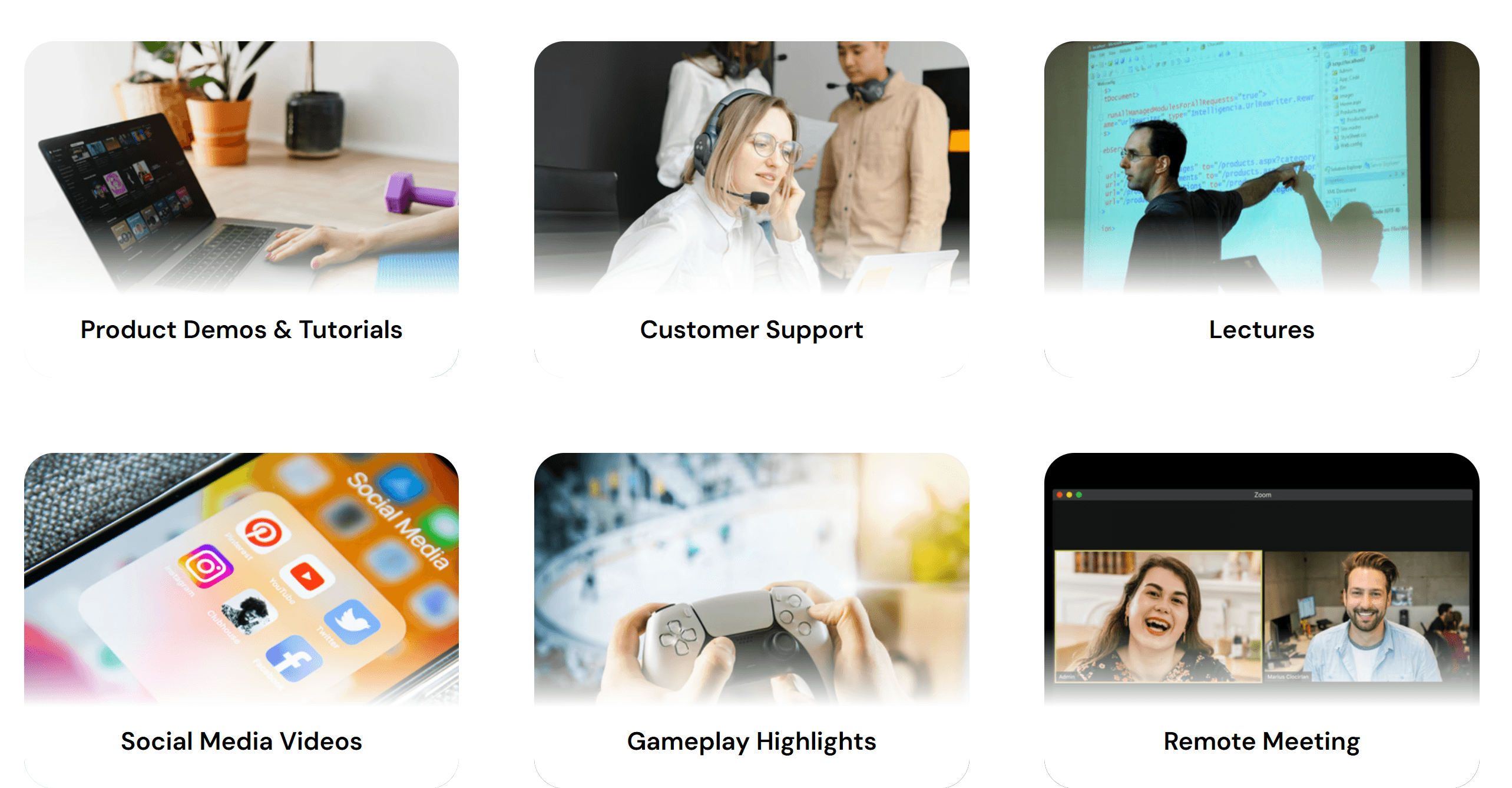
One thing many screen recorders get wrong is offering features that look nice on paper but don’t translate into actual daily use. 1001 Record avoids that problem. Everything it offers is genuinely practical.
Here are scenarios where it excels:
💼 Product demos & tutorials — clean visuals, intuitive recording.
🎧 Customer support — record an issue once, send it instantly.
🎓 Lectures & teaching — capture explanations, on-screen notes, or live sessions.
📱 Social media content — quick recordings ideal for TikTok, Reels, Shorts.
🎮 Gameplay highlights — smooth performance even during intense action.
👥 Remote meeting documentation — keep track of what was said and shared.
In short, it's not just a tool for creators—it’s useful for almost anyone who works on a Mac.

One thing many screen recorders get wrong is offering features that look nice on paper but don’t translate into actual daily use. 1001 Record avoids that problem. Everything it offers is genuinely practical.
Here are scenarios where it excels:
💼 Product demos & tutorials — clean visuals, intuitive recording.
🎧 Customer support — record an issue once, send it instantly.
🎓 Lectures & teaching — capture explanations, on-screen notes, or live sessions.
📱 Social media content — quick recordings ideal for TikTok, Reels, Shorts.
🎮 Gameplay highlights — smooth performance even during intense action.
👥 Remote meeting documentation — keep track of what was said and shared.
In short, it's not just a tool for creators—it’s useful for almost anyone who works on a Mac.

One thing many screen recorders get wrong is offering features that look nice on paper but don’t translate into actual daily use. 1001 Record avoids that problem. Everything it offers is genuinely practical.
Here are scenarios where it excels:
💼 Product demos & tutorials — clean visuals, intuitive recording.
🎧 Customer support — record an issue once, send it instantly.
🎓 Lectures & teaching — capture explanations, on-screen notes, or live sessions.
📱 Social media content — quick recordings ideal for TikTok, Reels, Shorts.
🎮 Gameplay highlights — smooth performance even during intense action.
👥 Remote meeting documentation — keep track of what was said and shared.
In short, it's not just a tool for creators—it’s useful for almost anyone who works on a Mac.
Simple, Honest Pricing
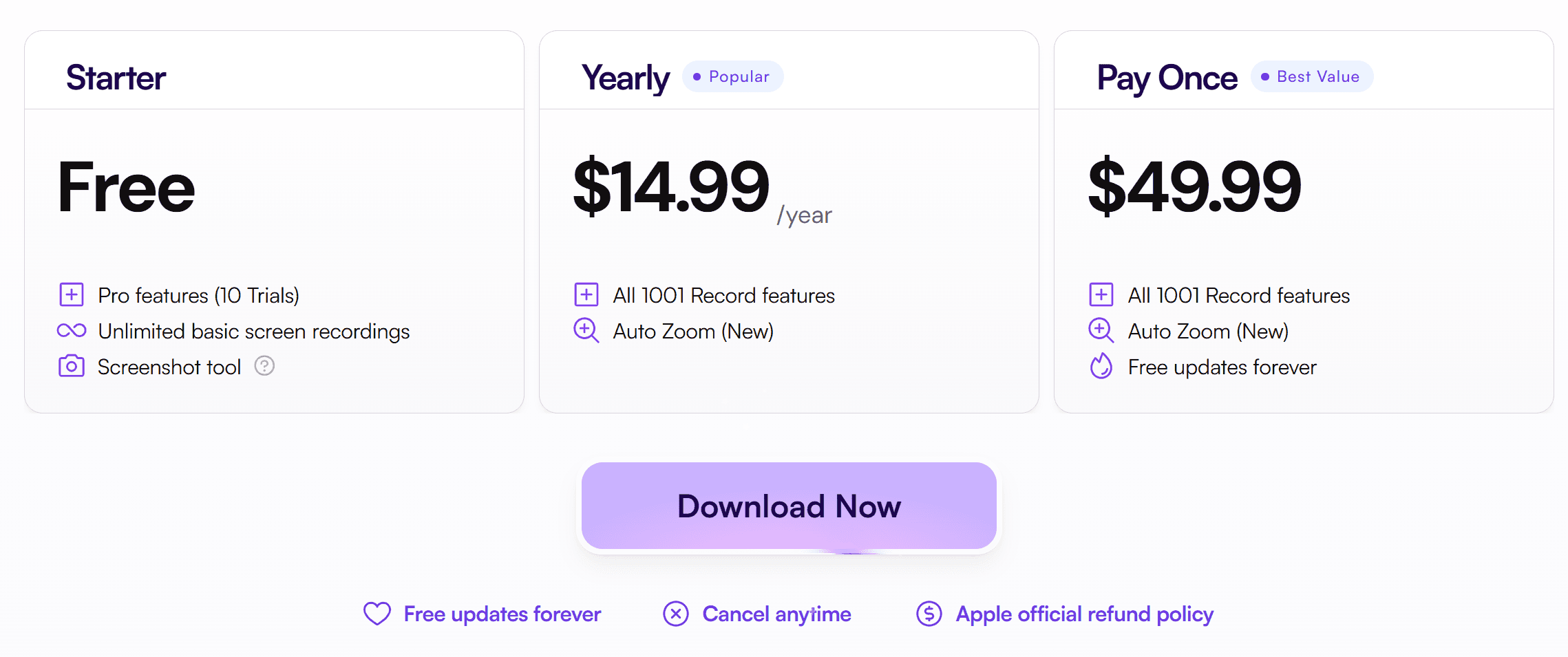
Another area where 1001 Record shines is its straightforward pricing. No confusion, no bundles, no aggressive upselling. Just three clear options:
🆓 Starter — Free
10 recordings with Pro features
Unlimited basic screen recordings
No watermarks
No time limits
Screenshot tools
The free tier is generous and more than enough for casual use.
⭐ Yearly — $14.99/year
All features unlocked
Includes Auto-Zoom (NEW)
Perfect for people who use it frequently but prefer a low yearly cost.
👑 Lifetime — $49.99
Everything included
Auto-Zoom
Free updates forever
If you dislike subscriptions (like many of us), this is easily the best value.
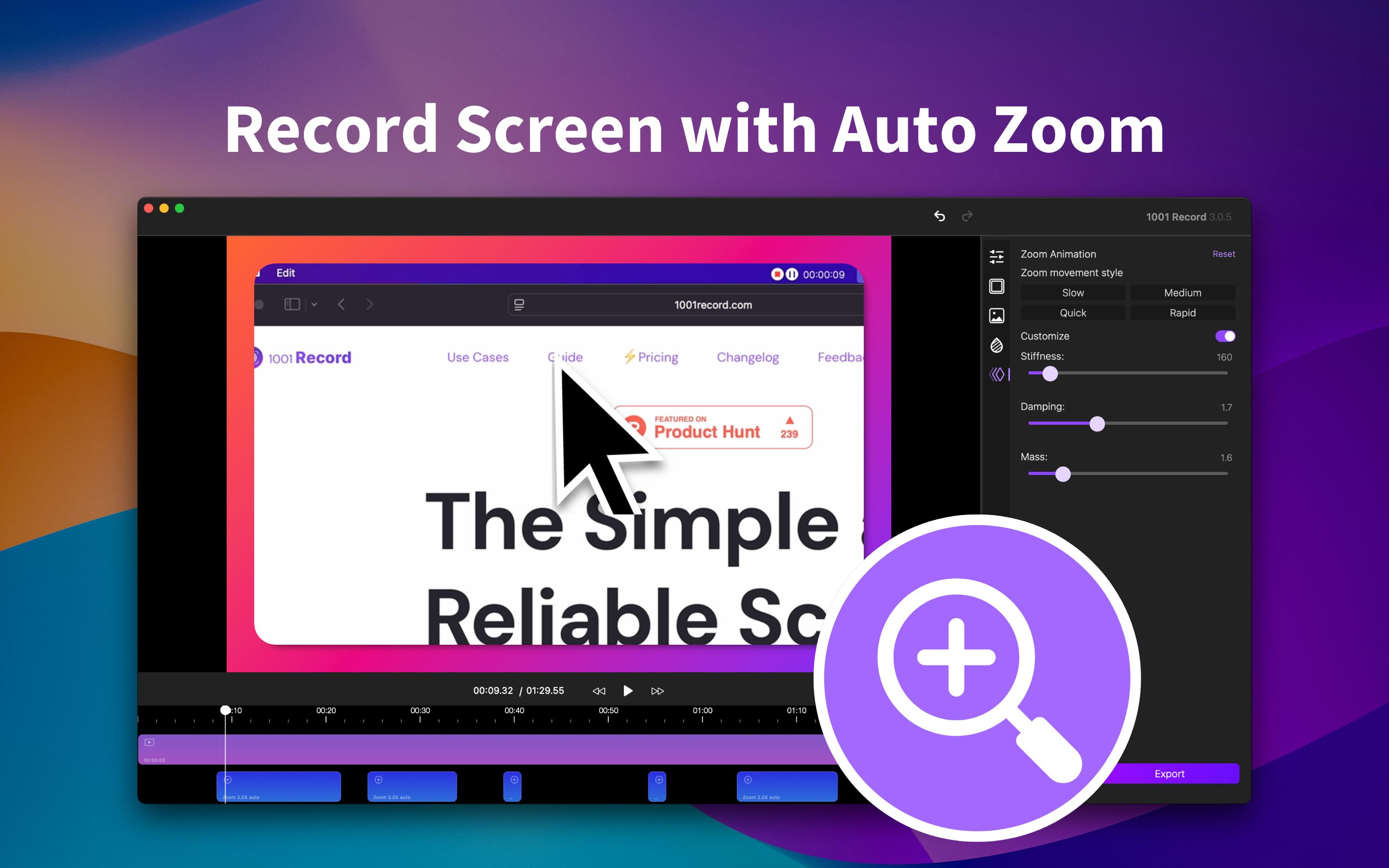

Another area where 1001 Record shines is its straightforward pricing. No confusion, no bundles, no aggressive upselling. Just three clear options:
🆓 Starter — Free
10 recordings with Pro features
Unlimited basic screen recordings
No watermarks
No time limits
Screenshot tools
The free tier is generous and more than enough for casual use.
⭐ Yearly — $14.99/year
All features unlocked
Includes Auto-Zoom (NEW)
Perfect for people who use it frequently but prefer a low yearly cost.
👑 Lifetime — $49.99
Everything included
Auto-Zoom
Free updates forever
If you dislike subscriptions (like many of us), this is easily the best value.


Another area where 1001 Record shines is its straightforward pricing. No confusion, no bundles, no aggressive upselling. Just three clear options:
🆓 Starter — Free
10 recordings with Pro features
Unlimited basic screen recordings
No watermarks
No time limits
Screenshot tools
The free tier is generous and more than enough for casual use.
⭐ Yearly — $14.99/year
All features unlocked
Includes Auto-Zoom (NEW)
Perfect for people who use it frequently but prefer a low yearly cost.
👑 Lifetime — $49.99
Everything included
Auto-Zoom
Free updates forever
If you dislike subscriptions (like many of us), this is easily the best value.

Top Questions — Answered Quickly
To clear up the most common concerns:
Is it free? Yes — with 10 free full-access uses (with Pro features). After that, basic screen & audio recording stays free.
Can it record screen + sound? Absolutely. Both system and mic audio.
Does it upload anything to the cloud? No, all recordings stay on your Mac.
Where can I download it? Directly from the Mac App Store.
Is there an educational discount? Yes — students can email the support team.
These answers show how the app focuses on being open, reliable, and user-friendly.
To clear up the most common concerns:
Is it free? Yes — with 10 free full-access uses (with Pro features). After that, basic screen & audio recording stays free.
Can it record screen + sound? Absolutely. Both system and mic audio.
Does it upload anything to the cloud? No, all recordings stay on your Mac.
Where can I download it? Directly from the Mac App Store.
Is there an educational discount? Yes — students can email the support team.
These answers show how the app focuses on being open, reliable, and user-friendly.
To clear up the most common concerns:
Is it free? Yes — with 10 free full-access uses (with Pro features). After that, basic screen & audio recording stays free.
Can it record screen + sound? Absolutely. Both system and mic audio.
Does it upload anything to the cloud? No, all recordings stay on your Mac.
Where can I download it? Directly from the Mac App Store.
Is there an educational discount? Yes — students can email the support team.
These answers show how the app focuses on being open, reliable, and user-friendly.
Future Features That Would Make It Even Better
Even though 1001 Record is already a strong product, the roadmap is packed with exciting potential upgrades. These come from the internal feature-suggestion document and show a clear vision for continued improvement.
Some standout possibilities:
🎚️ Multitrack exporting (separate audio/video layers).
✂️ Text-based editing for ultra-fast cuts.
🎞️ GIF exporting for quick social share moments.
💾 Project saving to continue editing later.
🌐 Cloud collaboration for webinars.
🔍 Advanced Auto-Zoom controls.
🎥 Next-level webcam tools like AI lighting adjustments.
📤 Direct upload integrations with cloud services.
🔊 AI audio cleanup (noise reduction, voice isolation).
💬 Automatic caption generation.
🎨 Transitions between edited clips.
📦 More export formats, including GIF and additional MOV/AVI options.
🧰 Homebrew installation for advanced Mac users.
Knowing what’s planned gives extra confidence that the app will continue improving.
Even though 1001 Record is already a strong product, the roadmap is packed with exciting potential upgrades. These come from the internal feature-suggestion document and show a clear vision for continued improvement.
Some standout possibilities:
🎚️ Multitrack exporting (separate audio/video layers).
✂️ Text-based editing for ultra-fast cuts.
🎞️ GIF exporting for quick social share moments.
💾 Project saving to continue editing later.
🌐 Cloud collaboration for webinars.
🔍 Advanced Auto-Zoom controls.
🎥 Next-level webcam tools like AI lighting adjustments.
📤 Direct upload integrations with cloud services.
🔊 AI audio cleanup (noise reduction, voice isolation).
💬 Automatic caption generation.
🎨 Transitions between edited clips.
📦 More export formats, including GIF and additional MOV/AVI options.
🧰 Homebrew installation for advanced Mac users.
Knowing what’s planned gives extra confidence that the app will continue improving.
Even though 1001 Record is already a strong product, the roadmap is packed with exciting potential upgrades. These come from the internal feature-suggestion document and show a clear vision for continued improvement.
Some standout possibilities:
🎚️ Multitrack exporting (separate audio/video layers).
✂️ Text-based editing for ultra-fast cuts.
🎞️ GIF exporting for quick social share moments.
💾 Project saving to continue editing later.
🌐 Cloud collaboration for webinars.
🔍 Advanced Auto-Zoom controls.
🎥 Next-level webcam tools like AI lighting adjustments.
📤 Direct upload integrations with cloud services.
🔊 AI audio cleanup (noise reduction, voice isolation).
💬 Automatic caption generation.
🎨 Transitions between edited clips.
📦 More export formats, including GIF and additional MOV/AVI options.
🧰 Homebrew installation for advanced Mac users.
Knowing what’s planned gives extra confidence that the app will continue improving.
Final Verdict
1001 Record is, without question, one of the best screen recorders for Mac available today.
It blends simplicity with power, delivering a fast, clean, and privacy-first recording experience. The fact that the free version is already strong makes it an easy recommendation, and the lifetime license adds incredible long-term value.
If you hate complicated software—or you’re simply tired of being surprised by hidden limitations—this app will feel like a breath of fresh air.
⬇️ Download 1001 Record | macOS
1001 Record is, without question, one of the best screen recorders for Mac available today.
It blends simplicity with power, delivering a fast, clean, and privacy-first recording experience. The fact that the free version is already strong makes it an easy recommendation, and the lifetime license adds incredible long-term value.
If you hate complicated software—or you’re simply tired of being surprised by hidden limitations—this app will feel like a breath of fresh air.
⬇️ Download 1001 Record | macOS
1001 Record is, without question, one of the best screen recorders for Mac available today.
It blends simplicity with power, delivering a fast, clean, and privacy-first recording experience. The fact that the free version is already strong makes it an easy recommendation, and the lifetime license adds incredible long-term value.
If you hate complicated software—or you’re simply tired of being surprised by hidden limitations—this app will feel like a breath of fresh air.
⬇️ Download 1001 Record | macOS
Join our community for more.
